EXPLORE BRUSH OPACITY
Let's explore different opacities for brushes.

Let's explore drawing with different brush opacities.
PRACTICE 1
Set your brush to "Flat Brush" under the Painting category, change the color to green, and set the bottom bar to the maximum.

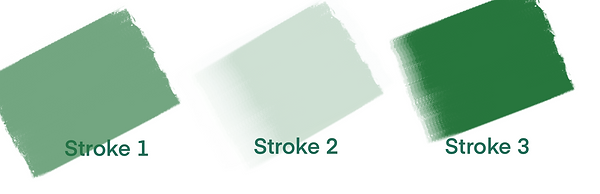
Which of the following brush strokes is created with these settings?
Correct!
With these settings, the brush opacity is at its highest, meaning the resulting brush stroke will be the highest visibility of these three. That's Brush Stroke 3!
Incorrect
With these settings, the brush opacity is at its highest, meaning the resulting brush stroke will be the highest visibility of these three. That's Brush Stroke 3!
Now that you are familiar with the interface, let's explore some different brushes.
PRACTICE 2
Set your brush to "Myrtle" under the Vintage category, change the color to red, and set the bottom bar right above the minimum.

Which of the following brush strokes is created with these settings?

Correct!
With these settings, the brush opacity is close to its lowest, meaning the resulting brush stroke will have the least visibility of these three. That's Brush Stroke 1!
Incorrect
With these settings, the brush opacity is close to its lowest, meaning the resulting brush stroke will have the least visibility of these three. That's Brush Stroke 1!
Take a moment and think about the relationship between the placement of the bottom bar and the resulting stroke.
What is the relationship between the bottom bar and the brush stroke?